 New: SalesBlink is now in ChatGPT
Inbound sales automation
When a new lead lands in your CRM, SalesBlink enrolls them, AI writes their follow-up and the AI Reply Agent handles the answer.
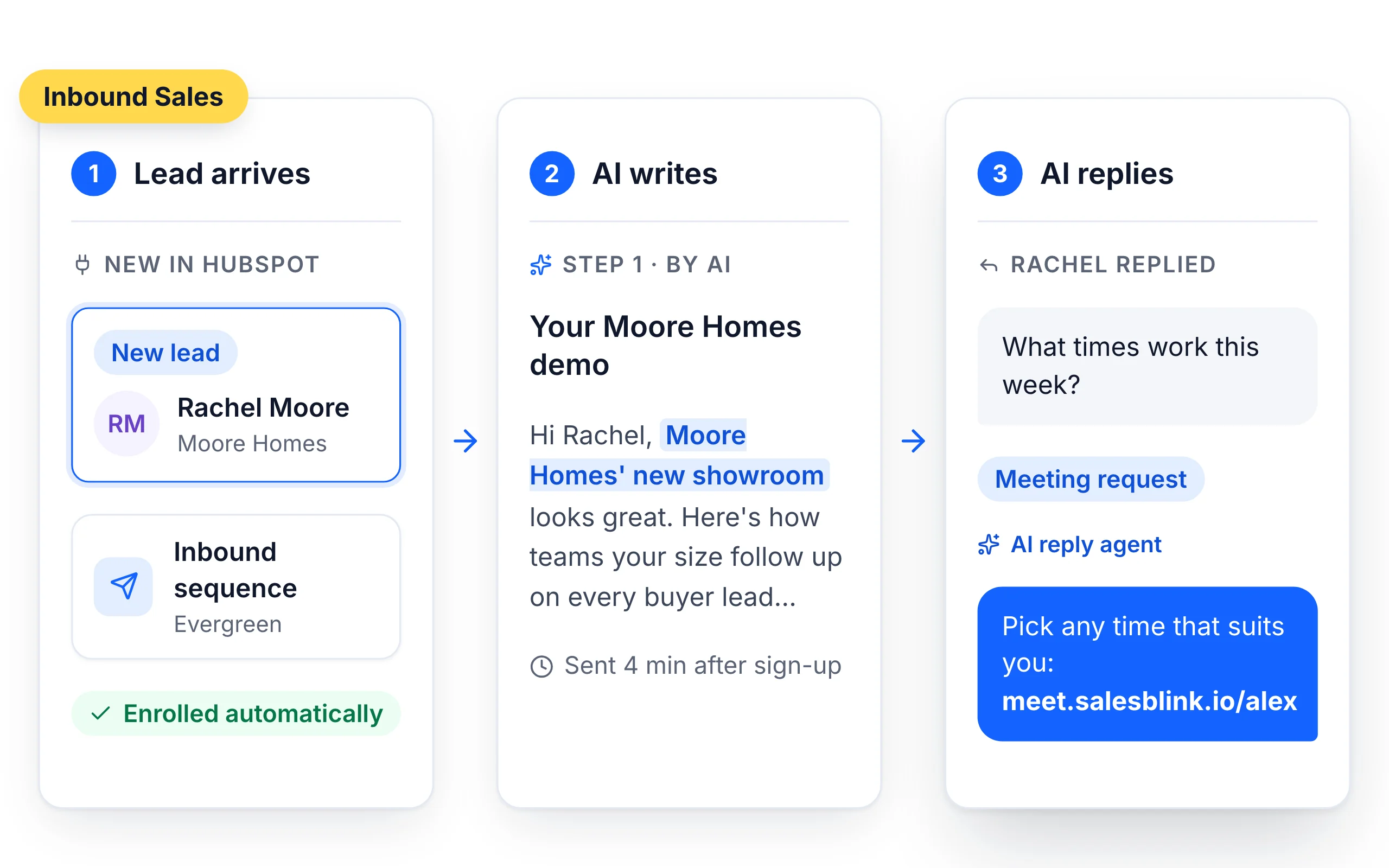
From form fill to booked call
- 01
A lead arrives
A new contact lands in HubSpot, Pipedrive or Zoho CRM, or comes in through Zapier, Make, Pabbly Connect, Integrately or n8n.
- 02
It joins a sequence
An evergreen sequence connected to the CRM enrolls the lead automatically.
- 03
AI writes the follow-up
The Outreach Agent writes from the lead's company website and the details in your CRM.
- 04
AI handles the reply
The AI Reply Agent tags the reply, answers it and sends your booking link.
AI Reply Agent



Connect your stack
Your CRM stays the source of truth
- Native integrations with HubSpot, Pipedrive and Zoho CRM: leads come in, and activity is logged back as notes
- Zapier, Make, Pabbly Connect, Integrately and n8n for other tools
- CSV and Google Sheets imports with custom field mapping
- A REST API and MCP server when you want to build it yourself
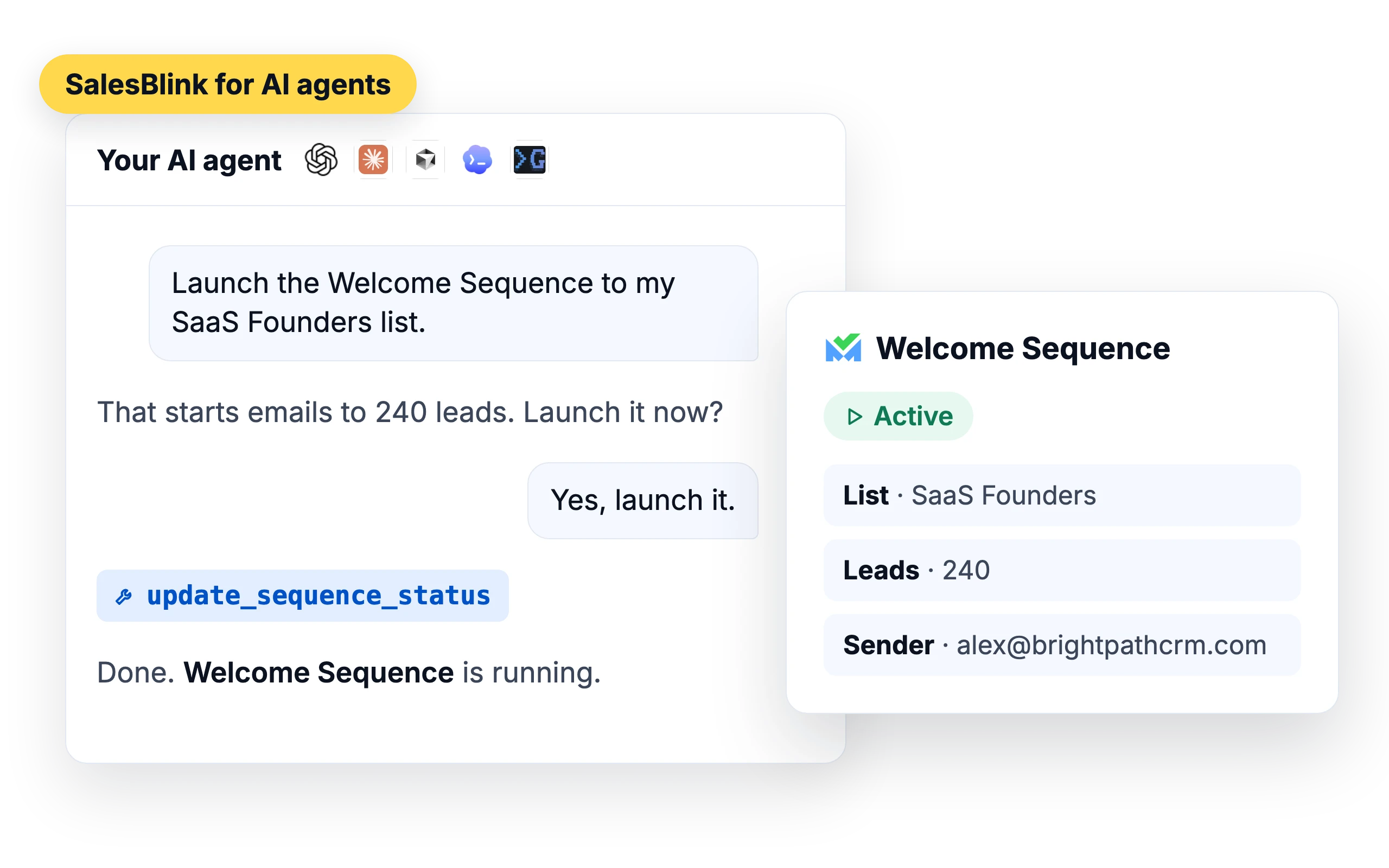
Run it from ChatGPT or Claude
Connect your AI agent and ask it to launch a sequence or show this week's interested replies.




What customers say
4.7/5 on Capterra (286 reviews)4.5/5 on G2 (311 reviews)
5.0 on G2
“…the process is simple, I was able to create conditional logic for emails and replies and sequences only took me 10 mins to have everything set up. Now all I need to do is send in leads and I'm done!”
Frequently asked questions
Which CRMs sync natively?
HubSpot, Pipedrive and Zoho CRM have native integrations: leads come in, and activity is logged back as notes. Anything else connects through Zapier, Make, Pabbly Connect, Integrately or n8n, or directly via the REST API.
How fast does the first follow-up go out?
As soon as the contact reaches SalesBlink and the sequence starts, subject to the sending schedule you set. You control the delays, so a hot demo request can be answered in minutes while a content download can wait until the next morning.
Does activity show up back in my CRM?
Yes. SalesBlink logs email activity back to HubSpot, Pipedrive and Zoho CRM as notes. It doesn't change your CRM fields.
What does the AI Reply Agent do?
It tags every incoming reply (Interested, Not interested, Meeting request, Out of office and more) and can draft the response for you. Run it in Human-in-the-Loop mode where you approve each reply, or on Autopilot once you trust it.
Can I run this from Claude or ChatGPT?
Yes. SalesBlink has an MCP server and an open source AI Agent Skill, so Claude, ChatGPT, Cursor, Codex, Gemini CLI and other clients can enroll leads, adjust sequences, read the inbox and pull reports in plain English.
Can I use this alongside my outbound campaigns?
Yes. Inbound and outbound share the same sequences, senders, warmup, inbox and reporting, so you are not paying for or maintaining two separate systems.
How soon does a new lead enter an evergreen sequence?
Right away, unless the list runs checks first. With duplicate removal on, the lead joins after the next duplicate check, which runs about every 10 minutes. With email verification on, it joins once the address is verified. Leads in a Google Sheet list join at the daily sync. A paused sequence doesn't pick up new leads.
Can the same lead get a sequence twice?
No. A lead, matched by email address, enters a sequence only once. If the same person is added to the connected list again, for example from a second form fill, the evergreen sequence doesn't enroll them a second time. Moving a lead into an evergreen list follows the same rules, including duplicate removal and verification.
Can I send only new HubSpot contacts into a sequence?
Yes. When you pick a HubSpot view as the sequence's lead source, choose Leads added from now on under Filter Leads. The other options are Leads added previously and All Leads. For new contacts to keep entering the sequence, turn on Make it Evergreen Sequence in the sequence settings.
Can people who book a meeting be added to a sequence?
Yes. In Meet → Settings, turn on Save Attendees to List and pick a list. Everyone who books is added with their name and email. Then build an evergreen sequence with that list as its source. Booking form questions can be mapped to SalesBlink variables, so answers such as a phone number or website can go into your emails.